
Snippets: How to Generate Sales Script With AI Writer in CapCut Desktop Video Editor

Do you have difficulty writing sales scripts for your videos? A large number of individuals struggle to express their ideas in a manner that sells. Handwriting the scripts is very time-consuming and may become disheveled or disjointed.
CapCut Desktop Video Editor allows you to use AI Writer to write clear and ready-to-use sales scripts with only a few clicks. The tool assists you in organizing your script in a way that makes sense, i.e., starting with a powerful hook and then to the central messag,e and finally a call to action.
Regardless of whether you are new to video making or you are in a hurry, CapCut PC can help you to easily create scripts that appear professional and sound compelling. This tutorial will demonstrate how to go about using AI Writer to improve and shorten your sales videos.
AI Writer is a CapCut PC tool that will assist you in writing scripts for your videos using only a few ideas. All you need to do is enter your key points or product information, and it creates a whole script for your sales video.
This is an extremely useful tool when it comes to sales videos. It structures your content into a clear sequence, beginning with a hook, presenting the problem, providing a solution, and a powerful call-to-action. It also maintains your tone, be it friendly, formal, or persuasive.
Using AI Writer saves time. You do not need to waste hours brainstorming and writing drafts. It creates quality scripts within a few seconds, and you can tailor them to fit your branded voice.
This translates to improved engagement for marketers and those who create content. The scripts are concerned with what the audience is interested in. CapCut Desktop Video Editor offers free trial, though there are certain features such as detailed script customizations that need to be paid with respect to.
When should AI Writers be used in Sales Scripts?
AI writers simplify the process of writing sales scripts. You are able to borrow some of the ideas and develop them into a complete script, which is ready to be used.
It is also useful in maintaining your content. The tone and style are retained when you make multiple sales videos, and it gives the impression of a professional brand.
The tool is time-saving. You do not have to draft manually anymore. CapCut PC, on the other hand, provides you with a polished script, which you can use immediately.
AI Writer is used in numerous types of videos. It can be utilized in social media advertisements, product demonstrations, webinars, and other marketing packages. AI Storyboard is also another tool to plan your visuals with the script, and it is easier to match scenes to your content.
To learn more, go to the official page of CapCut AI Writer to view all of its functions.
Sales Script Generation with an AI writer on CapCut PC
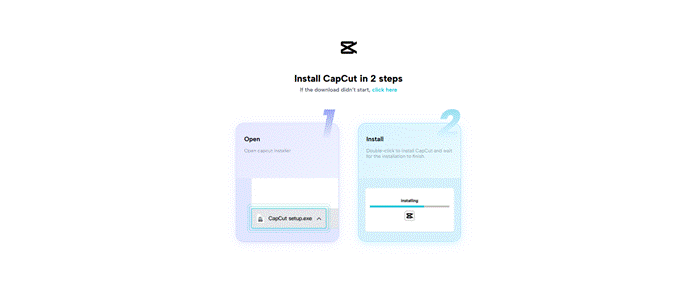
Step 1: Add CapCut Desktop Video Editor
The first thing is to download CapCut PC from the official site. Ensure that your computer has the specifications of the system requirements, like sufficient RAM, storage, and a compatible operating system.
The free basic editing tools of CapCut Desktop Video Editor are free, though certain features powered by AI, such as advanced script customization, require payment.
Step 2: Open AI Video Maker and Ideate Sales.
Click on AI Video Maker on the main screen of Open CapCut Desktop Video Editor.
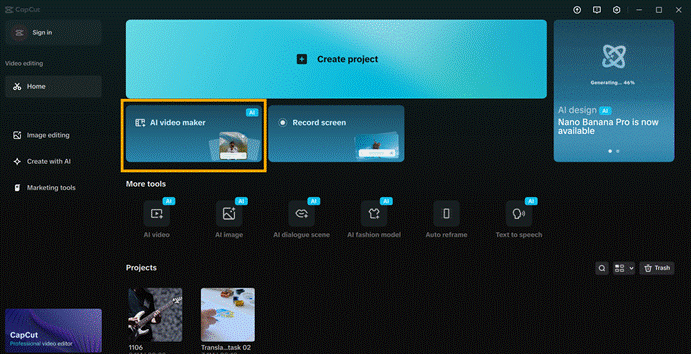
Then choose the option of Brainstorm with AI to begin generating script ideas. Enter your product or sales target in the input box.

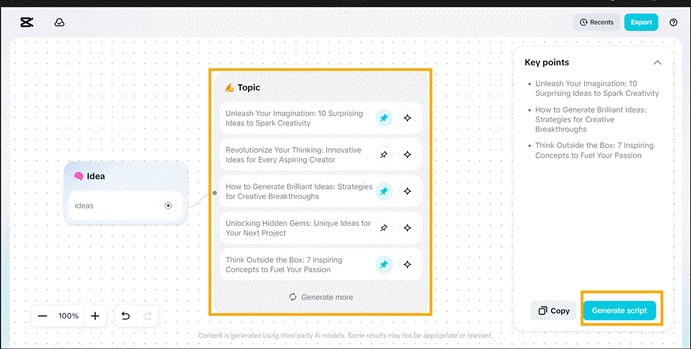
The AI will tell a list of possible script topics and angles. Choose the one that suits best, or get more of them and get inspired. Once a topic has been finalized, it will automatically become key points in your script.
You can also plan the way your ideas will appear on the screen with the help of the AI Storyboard at this point.
Step 3: Creative & Optimize Your Sales Script
Click on the Generate Script to generate the complete sales script. Before using it, you can customize it: select the length of the video and include instructions for more requirements, such as tone or style, such as friendly, formal, or persuasive. Press Generate to have the AI generate the script.
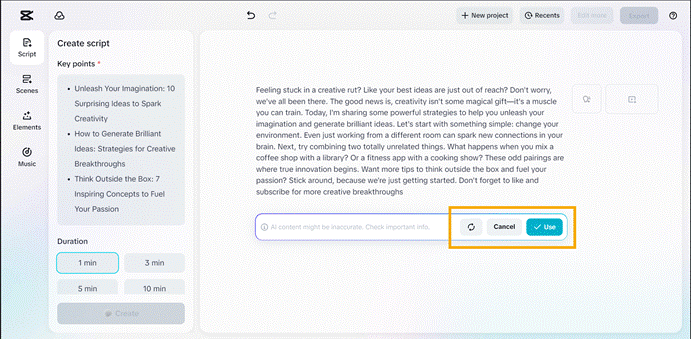
After doing so, you can do three things:
- Use: accept the script as it is.
- Rewrite: ask AI to rewrite another version.
- Cancel: This cancels pursuing a different idea.
This step demonstrates the flexibility of AI Writer. You are able to rewrite scripts to fit various audiences, products, or social media, and save time and effort.
AI Writer makes certain that your text has a clear pattern of hook, call-to-action, etc. Remember that some advanced features, including script length optimization or tone adjustment, can be available only on a subscription to CapCut Desktop Video Editor.
AIWriter can be used in CapCut Desktop Video Editor to enable marketers and creators to make sales scripts faster. You can convert ordinary thoughts into scripts that are ready to work, and you save time, and your content is similar throughout videos.
It gives your videos a professional appearance as well as keeps your audience interested throughout the video. Using CapCut PC AI Writer, you can start making scripts that can work with any product or campaign.
Create your first AI-assisted sales script and test it in Visit CapCut Desktop Video Editor and watch your video marketing performance improve in real-time.


 The Ranting Panda
Rant here!